
Questions & Answers
Before asking, please do a search to see if the samequestion has already been asked and answered.

New release for the holidays! (Beta 3)

Quote from Niels on December 24, 2025, 9:08 amThis is beta release 3 - one of our very last steps towards the finished Animation Paper v5.0.
What’s new since last release:
First of all, we crushed a lot of bugs! Improved on many issues throughout the software.That’s what the beta period really is all about - fixing bugs. But we accidentally stepped off track a little bit, sorry, we couldn’t help our selves! 🙂 So we did these small features too…
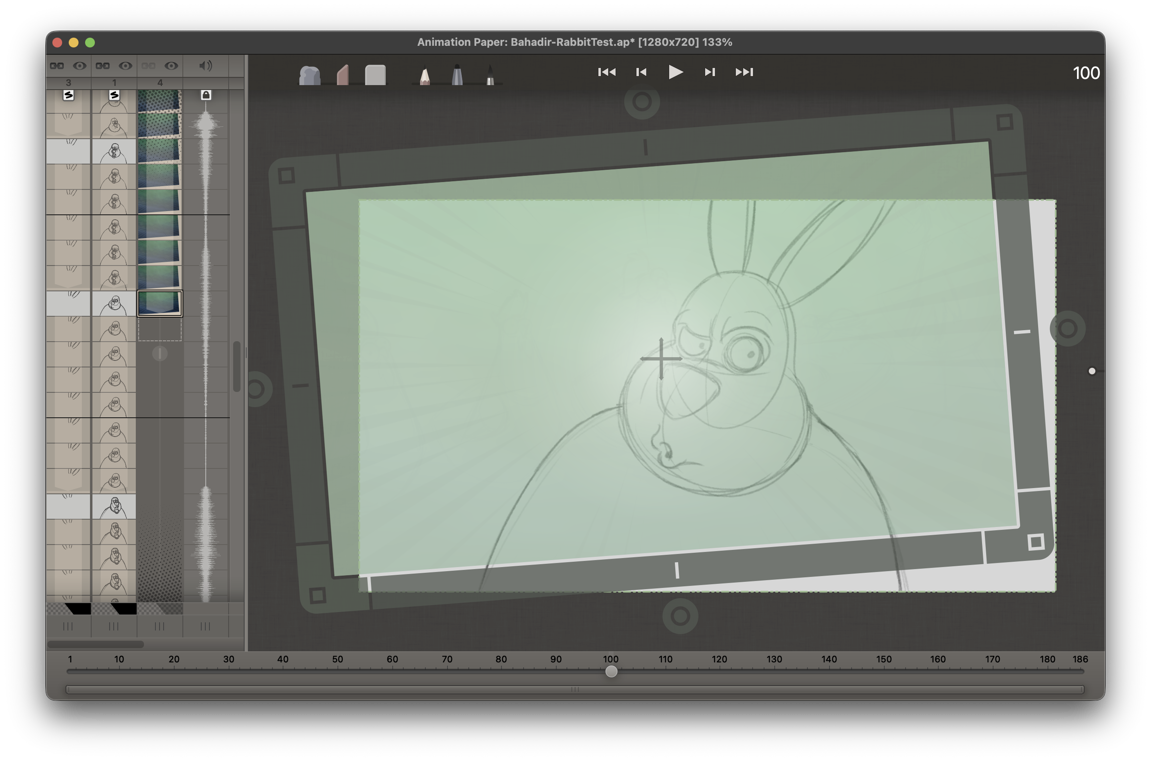
Transform Reference Layer. When you import images to use for reference, like model sheets, layouts, backgrounds or sequences of frames for moving backgrounds, rotoscoping, etc - you can now adjust your reference to better fit your scene. You can move, rotate or scale (scale proportionally or width/height separately). You transform on a layer basis, so if you have more than one reference-image or -sequence imported, you transform each of these ref-layers individually. With a reference loaded, make sure it is active by clicking one of its thumbnails in the X-Sheet, - and then go to the menu X-Sheet > Transform Reference Layer. Or you can simply hit T on your keyboard. To exit Transform you hit T again or just select another tool, like a drawing tool. If you need to reset the transform, you go to X-Sheet > Reset Transform or press Shift T.
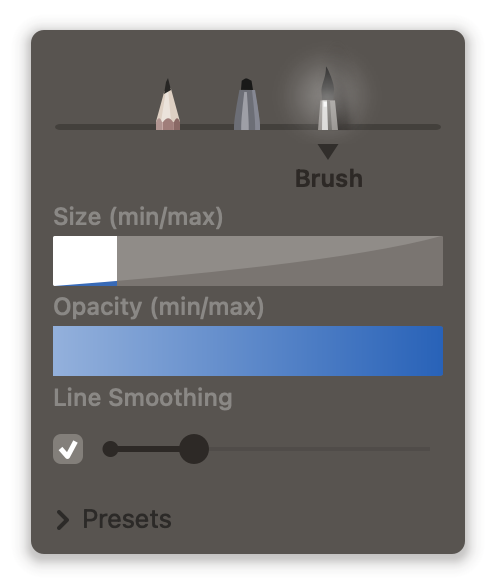
Line Smoothing on Brush drawing tool. In Animation Paper we have a general smart stabilizer that works at all time on all drawing tools, however, for your final inking, more control is needed. So we have added a simple smoothing option to the Brush. You can adjust how far behind it drags, meaning how much smoothing you get on your strokes.
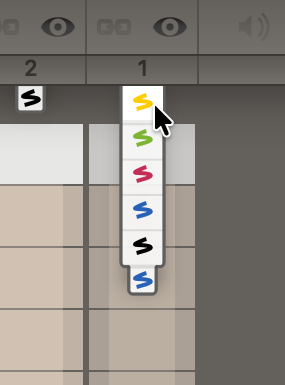
Yellow layer. To complement the colors you already have for your layers; blue, red, green and black - we have added a 5th layer-color: Yellow.
Oh, and we updated the design of the Animation Paper icon - also to comply with Mac Liquid Glass standards.
Now, go DOWNLOAD! Happy Holidays! Enjoy!
Thanks,
Niels
This is beta release 3 - one of our very last steps towards the finished Animation Paper v5.0.
What’s new since last release:
First of all, we crushed a lot of bugs! Improved on many issues throughout the software.
That’s what the beta period really is all about - fixing bugs. But we accidentally stepped off track a little bit, sorry, we couldn’t help our selves! 🙂 So we did these small features too…
Transform Reference Layer. When you import images to use for reference, like model sheets, layouts, backgrounds or sequences of frames for moving backgrounds, rotoscoping, etc - you can now adjust your reference to better fit your scene. You can move, rotate or scale (scale proportionally or width/height separately). You transform on a layer basis, so if you have more than one reference-image or -sequence imported, you transform each of these ref-layers individually. With a reference loaded, make sure it is active by clicking one of its thumbnails in the X-Sheet, - and then go to the menu X-Sheet > Transform Reference Layer. Or you can simply hit T on your keyboard. To exit Transform you hit T again or just select another tool, like a drawing tool. If you need to reset the transform, you go to X-Sheet > Reset Transform or press Shift T.
Line Smoothing on Brush drawing tool. In Animation Paper we have a general smart stabilizer that works at all time on all drawing tools, however, for your final inking, more control is needed. So we have added a simple smoothing option to the Brush. You can adjust how far behind it drags, meaning how much smoothing you get on your strokes.
Yellow layer. To complement the colors you already have for your layers; blue, red, green and black - we have added a 5th layer-color: Yellow.
Oh, and we updated the design of the Animation Paper icon - also to comply with Mac Liquid Glass standards.

Now, go DOWNLOAD! Happy Holidays! Enjoy!
Thanks,
Niels


Quote from ALESSIOLUPO82 on December 28, 2025, 8:53 amThanks.
Thanks.
Quote from Niels on December 28, 2025, 4:39 pmYou're welcome! And thanks to everybody using AP and reporting bugs! We want it as error free as humanly possible!
You're welcome! And thanks to everybody using AP and reporting bugs! We want it as error free as humanly possible!
Quote from ALESSIOLUPO82 on January 4, 2026, 4:07 pmHi. Any news on the color free update?
Hi. Any news on the color free update?
Quote from Niels on January 4, 2026, 4:52 pmThe coloring features are planned to be included in version 5.1 or 5.2. That is one of the first point-updates after the one, we are working on now, which is version 5.0. The current beta releases are gradually ramping up to the final 5.0.
So in short: We will do coloring as the first thing after we finish the version we are working on now.
- The beta versions are early, and free, test releases to get Animation Paper 5.0 tested on a large userbase.
- Animation Paper 5.0 is the finished product, that will be $79 usd as a one time fee (no subscription).
- Version 5.1, 5.2, etc will be free updates for 5.0 owners. These will include the coloring features.
I understand all this version-talk can be confusing. 🙂 Sorry for that. I do hope my above explanation clears things up a bit though.
Thanks,
NielsPS: While waiting for the coloring update, maybe you already know, that Animation Paper features several ways of exporting your animation, so it can be colored elsewhere. One way, is to export as OCA (Open Cell Animation) - read more about it here: https://animationpaper.com/help/animation-paper-oca-export/
The coloring features are planned to be included in version 5.1 or 5.2. That is one of the first point-updates after the one, we are working on now, which is version 5.0. The current beta releases are gradually ramping up to the final 5.0.
So in short: We will do coloring as the first thing after we finish the version we are working on now.
- The beta versions are early, and free, test releases to get Animation Paper 5.0 tested on a large userbase.
- Animation Paper 5.0 is the finished product, that will be $79 usd as a one time fee (no subscription).
- Version 5.1, 5.2, etc will be free updates for 5.0 owners. These will include the coloring features.
I understand all this version-talk can be confusing. 🙂 Sorry for that. I do hope my above explanation clears things up a bit though.
Thanks,
Niels
PS: While waiting for the coloring update, maybe you already know, that Animation Paper features several ways of exporting your animation, so it can be colored elsewhere. One way, is to export as OCA (Open Cell Animation) - read more about it here: https://animationpaper.com/help/animation-paper-oca-export/
Quote from ALESSIOLUPO82 on January 4, 2026, 6:41 pmOk, thanks. Very useful.
Ok, thanks. Very useful.