
Questions & Answers
Before asking, please do a search to see if the samequestion has already been asked and answered.

Fill the page with a reference background

Quote from ALESSIOLUPO82 on November 19, 2025, 9:52 pmHi. Is there a way to fill the page with a reference background? ive sent an attached file.
Hi. Is there a way to fill the page with a reference background? ive sent an attached file.
Uploaded files: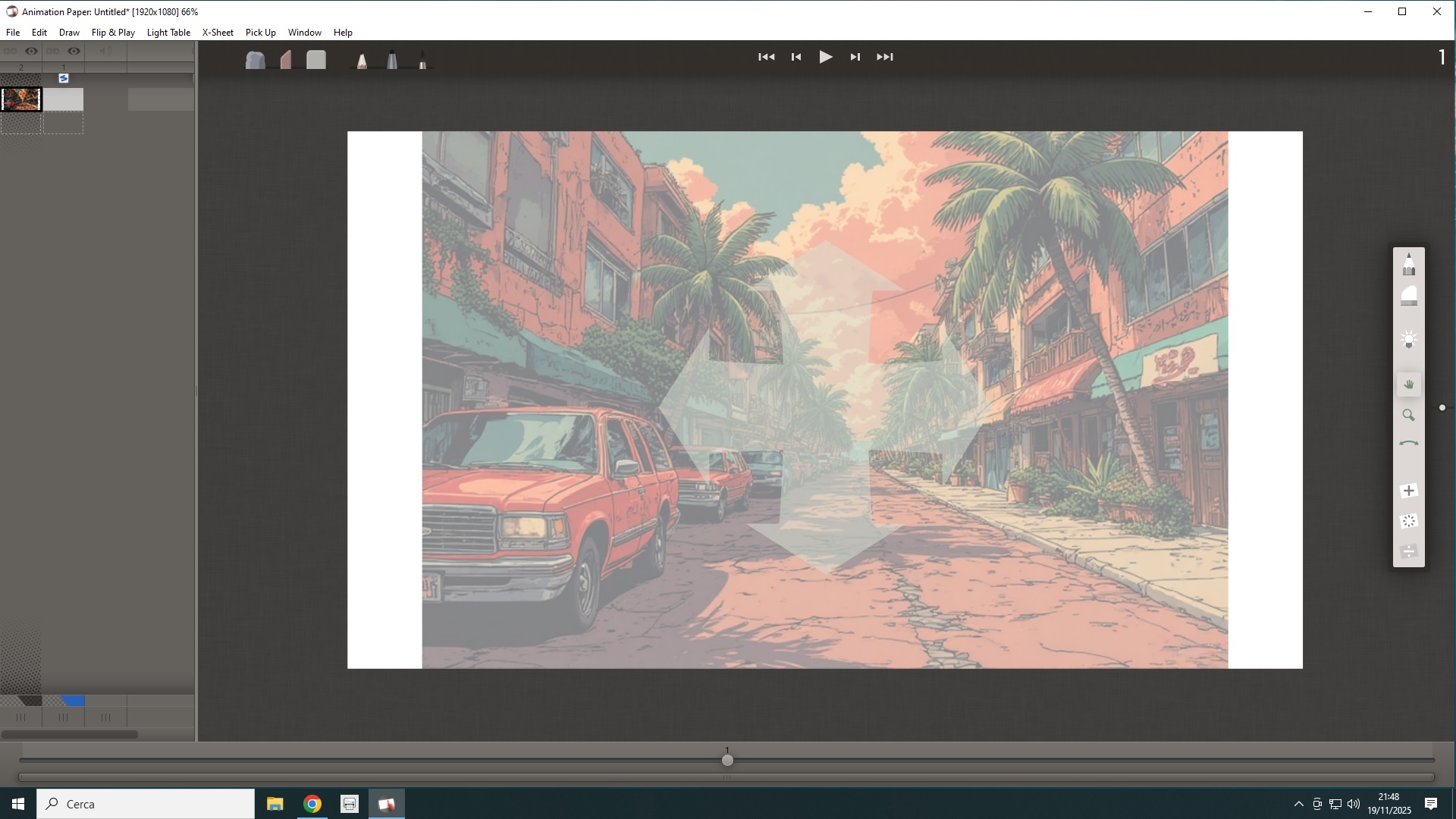

Quote from manimation on November 20, 2025, 2:05 amI don't believe there is currently a way to change the dimensions of a reference image as it's not possible to select it from within Animation Paper.
It would definitely be useful to have some form of control over the reference, maybe have it work as an editable image until locked as a reference. That way it could be resized (with the options to either maintain the correct ratio, which would crop the top/bottom or both parts of the image, or stretch to fit the page).
With how close AP is getting to release it might have to be an option for the next version.
I don't believe there is currently a way to change the dimensions of a reference image as it's not possible to select it from within Animation Paper.
It would definitely be useful to have some form of control over the reference, maybe have it work as an editable image until locked as a reference. That way it could be resized (with the options to either maintain the correct ratio, which would crop the top/bottom or both parts of the image, or stretch to fit the page).
With how close AP is getting to release it might have to be an option for the next version.

Quote from Niels on November 20, 2025, 8:07 amHi Alessiolupo82,
As Manimation rightly says, with the current release (Beta 2), it is not possible to adjust your reference image inside Animation Paper.
The way you do it is to make sure either your background image matches your animation scene or you match your animation scene to your background image. So before you import your image, you crop it (top and bottom) to become 16:9 format, like your scene (I see it is HD 1920x1080, which is 16:9). OR you can leave your background image as it is, and go to the Animation Paper menu File > Scene Settings... and adjust your resolution to fit your background. Make sure to select the Crop/Center option. You might have to try a few times to "guess" the correct numbers. I think say, 2000x1336, would fit your image. So set it like this...
Manimation, you ask for some form of control over the reference image/layer. I am happy to let you know that we are actually right now finalizing implementing just that. Check out the below screenshot I took from our internal version of Animation Paper just now. This is included in the next release (Beta 3) which is due in a couple of weeks or so.
Hi Alessiolupo82,
As Manimation rightly says, with the current release (Beta 2), it is not possible to adjust your reference image inside Animation Paper.
The way you do it is to make sure either your background image matches your animation scene or you match your animation scene to your background image. So before you import your image, you crop it (top and bottom) to become 16:9 format, like your scene (I see it is HD 1920x1080, which is 16:9). OR you can leave your background image as it is, and go to the Animation Paper menu File > Scene Settings... and adjust your resolution to fit your background. Make sure to select the Crop/Center option. You might have to try a few times to "guess" the correct numbers. I think say, 2000x1336, would fit your image. So set it like this...

Manimation, you ask for some form of control over the reference image/layer. I am happy to let you know that we are actually right now finalizing implementing just that. Check out the below screenshot I took from our internal version of Animation Paper just now. This is included in the next release (Beta 3) which is due in a couple of weeks or so.

Quote from ALESSIOLUPO82 on November 20, 2025, 12:53 pmThank you a lot.
Thank you a lot.
Quote from manimation on November 20, 2025, 1:09 pmEvery time anyone helps someone on this forum 'we can all stand just that little bit taller, that little bit wiser'. 😉
Every time anyone helps someone on this forum 'we can all stand just that little bit taller, that little bit wiser'. 😉