
Questions & Answers
Before asking, please do a search to see if the samequestion has already been asked and answered.

Idea clips / sub clips

Quote from ganim on September 30, 2025, 1:51 amIt would be nice to be able to define a range of frames and manage them as a clip or sub clip.. Naming doesn't matter. I used to do a lot of animating and just about every animation program has NEVER supported this.. It would be immensely helpful to be able to define and manage frame-sets for a character like this. Be able to preview them with the normal timeline play/pause/stop.. Plus dragging into the XSheet to put in place.. This would help manage repeatable frames and reduce the data in the backend of the program by referencing the clip reference, possibly. I don't know how you built the software but kudos either way. It's very nice and this is just a day dream feature to me.
It would be nice to be able to define a range of frames and manage them as a clip or sub clip.. Naming doesn't matter. I used to do a lot of animating and just about every animation program has NEVER supported this.. It would be immensely helpful to be able to define and manage frame-sets for a character like this. Be able to preview them with the normal timeline play/pause/stop.. Plus dragging into the XSheet to put in place.. This would help manage repeatable frames and reduce the data in the backend of the program by referencing the clip reference, possibly. I don't know how you built the software but kudos either way. It's very nice and this is just a day dream feature to me.

Quote from Niels on September 30, 2025, 6:59 amHi ganim, thanks for your kind words and this great suggestion of yours.
I do get what you are saying, but I would love to go into more detail with you in order to understand it fully. This is super interesting to me, and this could be a very usable and practical feature.
I do want to mention that AP already have a range, which however is only for looking at (and working in) one range of frames, - not having more ranges to move around. Also, we do have the clones-system, that enables you to have repeatable drawings, not only locally (after an original drawing), but as "distant" clone-drawings (making up sections of animation) elsewhere on the timeline. This, sort of, is working like a "clip" that can fairly easily be moved in time by adding/removing clones before and after. I know it is not the same as you are suggesting, just mentioning it for other readers of this post and to make sure you are aware.
Can you explain more please? How would you define and organize your clips from a user-experience/interface point of view? Maybe we could have clips shown as bars in the timeline (at the bottom) - also drag-able in the timeline. If you wanted to add or remove drawings in a clip, you would do it in the X-Sheet, where the boundaries of clips would also be visible. Moving a clip would be like dragging it through a sea of other drawings, or how do you see it, - how would it work? I guess a clip should be able to hold multiple layers, but that would complicate things quite a lot. Anyway, super interesting! Let's discuss this further if you have the time of course. I appreciate your time. You already put a seed in my head 😉 Thank you!
Hi ganim, thanks for your kind words and this great suggestion of yours.
I do get what you are saying, but I would love to go into more detail with you in order to understand it fully. This is super interesting to me, and this could be a very usable and practical feature.
I do want to mention that AP already have a range, which however is only for looking at (and working in) one range of frames, - not having more ranges to move around. Also, we do have the clones-system, that enables you to have repeatable drawings, not only locally (after an original drawing), but as "distant" clone-drawings (making up sections of animation) elsewhere on the timeline. This, sort of, is working like a "clip" that can fairly easily be moved in time by adding/removing clones before and after. I know it is not the same as you are suggesting, just mentioning it for other readers of this post and to make sure you are aware.
Can you explain more please? How would you define and organize your clips from a user-experience/interface point of view? Maybe we could have clips shown as bars in the timeline (at the bottom) - also drag-able in the timeline. If you wanted to add or remove drawings in a clip, you would do it in the X-Sheet, where the boundaries of clips would also be visible. Moving a clip would be like dragging it through a sea of other drawings, or how do you see it, - how would it work? I guess a clip should be able to hold multiple layers, but that would complicate things quite a lot. Anyway, super interesting! Let's discuss this further if you have the time of course. I appreciate your time. You already put a seed in my head 😉 Thank you!
Quote from ganim on September 30, 2025, 11:17 amAP already have a range.
I was playing with this earlier. Need to play around with this one more. I was trying to split up the timeline using this but didn't get it working as I thought I could, so I'll be reviewing the videos and see if I missed something.
Also, we do have the clones-system
using the clones to bring reused frames into timeline position, etc. Very useful.
A clip to me is basically a single layer sub animation. It just holds a list of frames that follow the same rules as expected for a normal animation. It's basically a container. Maybe it would possibly have a sidebar view of the characters and when selecting filling in the example view attached with the clip for the character. I didn't want to muddy the example too much - but was thinking possibly showing the total frame count of the clip in the thumbnail view of the clip on the bottom right.. Not sure atm - it's just an idea and doesn't have to be this specific at all. Feel free to reach out in email if you like as well.
I was seriously thinking about forking pencil2d and adding everything missing myself.. The problem with that one is it's brushes need to be fixed or replaced. The ink in this though, it's the cleanest I've seen yet. Looks good and works as expected, same with the pencil / blue line. So call me transfixed. Would be great to work on one of these apps.
AP already have a range.
I was playing with this earlier. Need to play around with this one more. I was trying to split up the timeline using this but didn't get it working as I thought I could, so I'll be reviewing the videos and see if I missed something.
Also, we do have the clones-system
using the clones to bring reused frames into timeline position, etc. Very useful.
A clip to me is basically a single layer sub animation. It just holds a list of frames that follow the same rules as expected for a normal animation. It's basically a container. Maybe it would possibly have a sidebar view of the characters and when selecting filling in the example view attached with the clip for the character. I didn't want to muddy the example too much - but was thinking possibly showing the total frame count of the clip in the thumbnail view of the clip on the bottom right.. Not sure atm - it's just an idea and doesn't have to be this specific at all. Feel free to reach out in email if you like as well.
I was seriously thinking about forking pencil2d and adding everything missing myself.. The problem with that one is it's brushes need to be fixed or replaced. The ink in this though, it's the cleanest I've seen yet. Looks good and works as expected, same with the pencil / blue line. So call me transfixed. Would be great to work on one of these apps.
Uploaded files: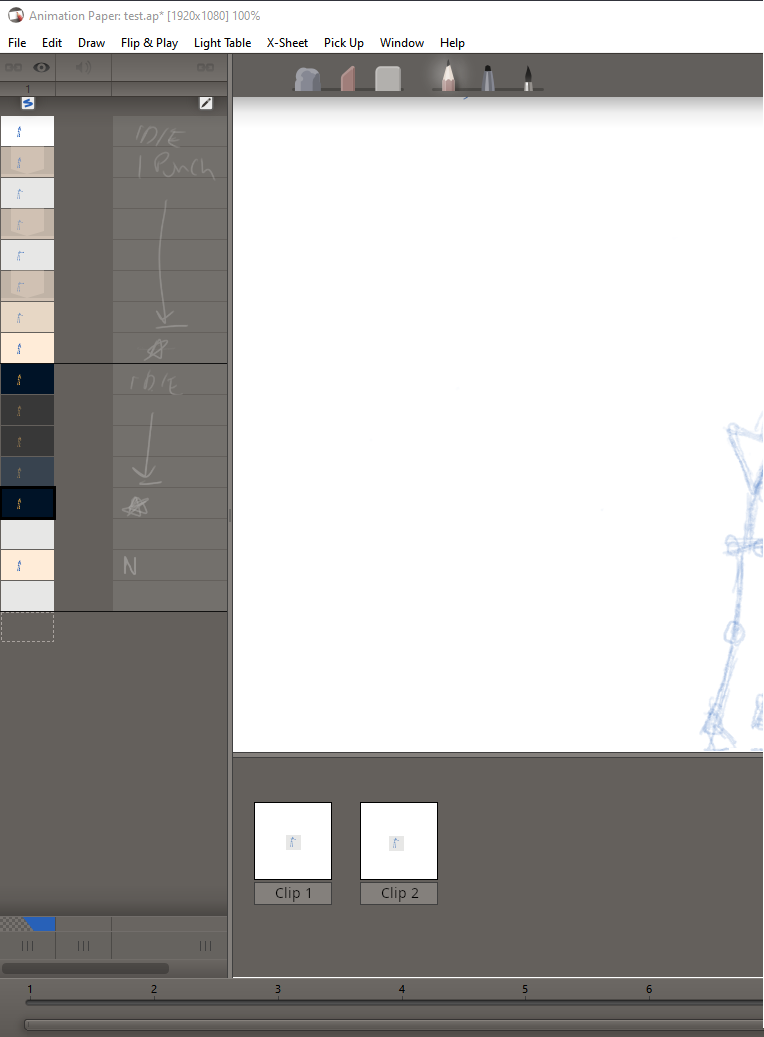
Quote from Niels on September 30, 2025, 5:26 pmThanks for elaborating! I will definitely keep this saved in my notes - and think deeper about the details and possibilities. Thanks again ganim!
Thanks for elaborating! I will definitely keep this saved in my notes - and think deeper about the details and possibilities. Thanks again ganim!