
Questions & Answers
Before asking, please do a search to see if the samequestion has already been asked and answered.

Slowing down when undoing/stalls the software

Quote from EinSoft on April 28, 2026, 3:23 amHey guys,
So while working on a frame, I've noticed that every time I want to undo something, the software hangs for a few seconds before undoing it. When I want to just spam undo, that's when it stalls and takes a fat minute to respond again. I was thinking maybe it was the amount of frames one scene can handle (as I experienced it in my gun demo animation) but I then realized it was frame dependent?
I would try out the undo function on a similar frame and works just fine, go back to the one I was one, hangs. Is it because I made too many strokes on a sketch than the other?
Hey guys,
So while working on a frame, I've noticed that every time I want to undo something, the software hangs for a few seconds before undoing it. When I want to just spam undo, that's when it stalls and takes a fat minute to respond again. I was thinking maybe it was the amount of frames one scene can handle (as I experienced it in my gun demo animation) but I then realized it was frame dependent?
I would try out the undo function on a similar frame and works just fine, go back to the one I was one, hangs. Is it because I made too many strokes on a sketch than the other?

Quote from Niels on April 28, 2026, 6:38 amThanks a lot for being so observant. It think it must be "the lasso problem" making your one frame (aka drawing) slow. (Read about it here: https://animationpaper.com/help/lineengine/)
Did you use the lasso at all on that frame?
Anyway, please try one of the following two solutions:
- Do a new blank drawing right after the problematic one. Redraw/trace your problematic drawing (no lassoing) onto the new blank using the light table. Delete the problematic drawing. Problem solved.
- Use the lasso to pick up all of the problematic drawing. AP should ask if you want to "Collapse". Please do so. Then just get rid of the picked up selection (hit Esc). Problem solved.
Please let me know if any of these solutions fixes the issue.
Thanks,
Niels
Thanks a lot for being so observant. It think it must be "the lasso problem" making your one frame (aka drawing) slow. (Read about it here: https://animationpaper.com/help/lineengine/)
Did you use the lasso at all on that frame?
Anyway, please try one of the following two solutions:
- Do a new blank drawing right after the problematic one. Redraw/trace your problematic drawing (no lassoing) onto the new blank using the light table. Delete the problematic drawing. Problem solved.
- Use the lasso to pick up all of the problematic drawing. AP should ask if you want to "Collapse". Please do so. Then just get rid of the picked up selection (hit Esc). Problem solved.
Please let me know if any of these solutions fixes the issue.
Thanks,
Niels
Quote from EinSoft on April 29, 2026, 1:36 amYeah, it definitely was "the lasso problem". I went and tried out the second solution as I didn't want to redraw it and fixed it. I do recall using the cut tool a lot on that one frame without collapsing it and that's what probably caused the slow down.
Thanks again for your help!
Yeah, it definitely was "the lasso problem". I went and tried out the second solution as I didn't want to redraw it and fixed it. I do recall using the cut tool a lot on that one frame without collapsing it and that's what probably caused the slow down.
Thanks again for your help!
Quote from Niels on April 29, 2026, 7:31 amOK, thanks a lot again for remembering all these things and letting me know. Very helpful!
OK, thanks a lot again for remembering all these things and letting me know. Very helpful!

Quote from chic_ken_wigs on May 3, 2026, 3:53 amHi i dont know how make a coment apart so i made it here, i have this problem when want export in mp4, it is exported like this, i tried reinstall the program but its not works 🙁
Hi i dont know how make a coment apart so i made it here, i have this problem when want export in mp4, it is exported like this, i tried reinstall the program but its not works 🙁
Uploaded files:
Quote from EinSoft on May 3, 2026, 5:36 amHi chic,
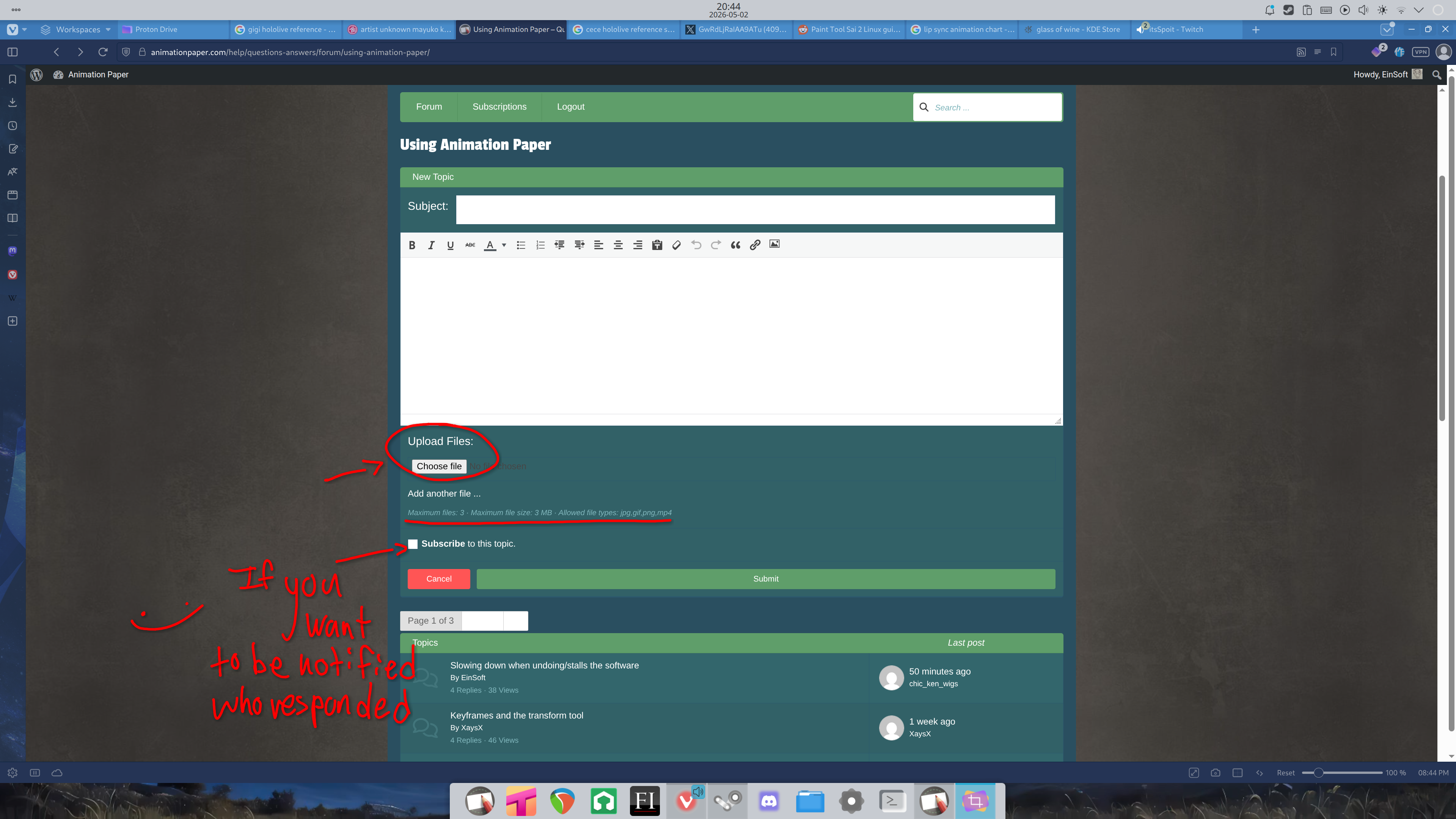
I've attached 2 screenshots on how to make a new post.
As for your .mp4 problem, I can't say I have any idea why your file turned out the way it did. Using the screenshot guide I've send you, could you please re-make the post and upload the .mp4 file in its entirety rather than a screenshot. I tested out one of my cuts to see if it's a software problem but it exported just fine. Perhaps it's a video codec problem on your side but I'm just spit balling here.
Hi chic,
I've attached 2 screenshots on how to make a new post.
As for your .mp4 problem, I can't say I have any idea why your file turned out the way it did. Using the screenshot guide I've send you, could you please re-make the post and upload the .mp4 file in its entirety rather than a screenshot. I tested out one of my cuts to see if it's a software problem but it exported just fine. Perhaps it's a video codec problem on your side but I'm just spit balling here.
Uploaded files: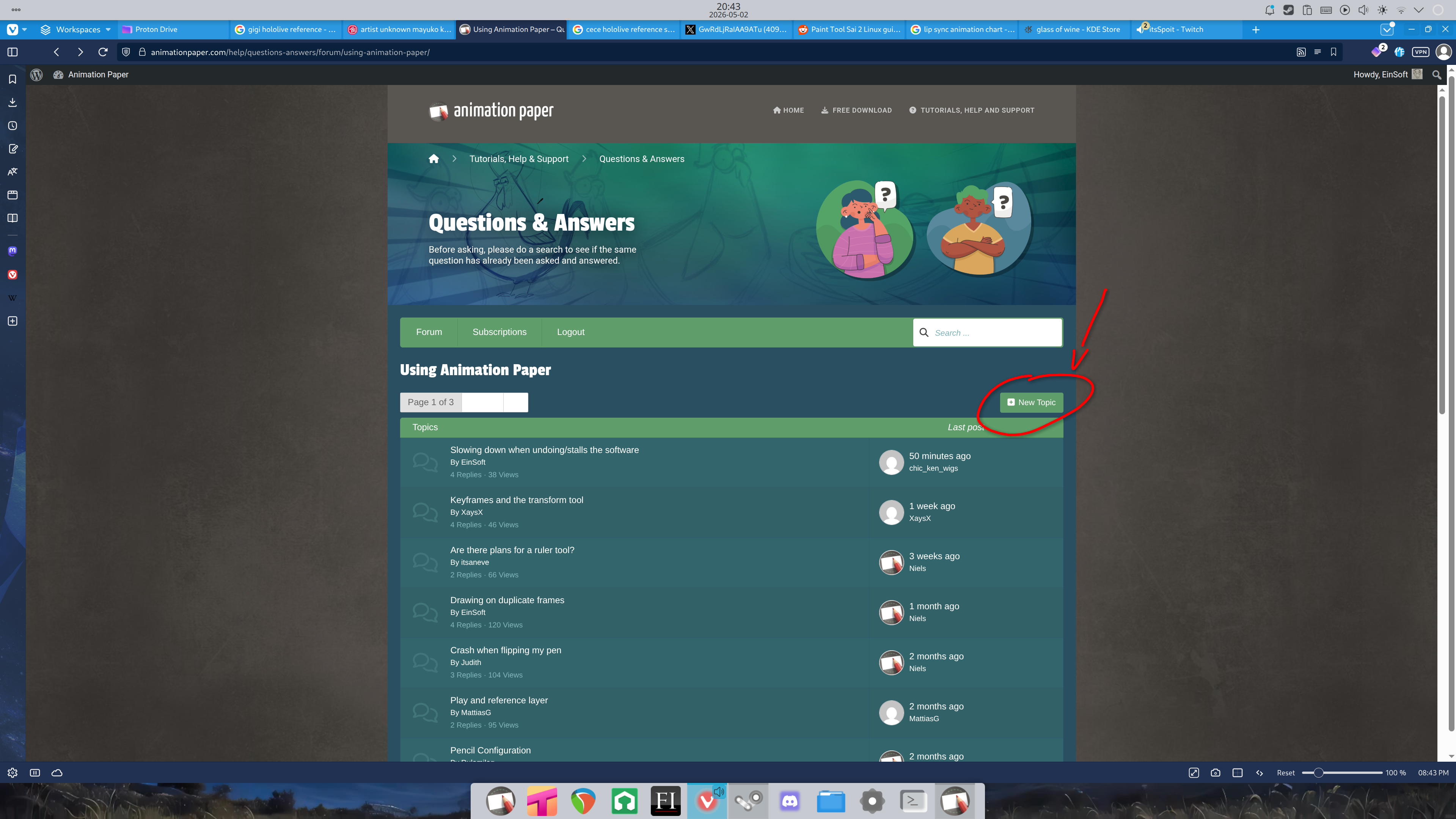
Quote from Niels on May 3, 2026, 12:06 pmHi chic_ken_wigs!
Thanks for your help EinSoft!
I am not sure what is causing this problem. But it must be something with codecs - when playing or when the mp4 is created. Would you mind sending your .ap file to me or EinSoft? My email is the one you got your activation key from. Then we can try to export it at our end to test if the same thing happens or not.
Thanks,
Niels
Hi chic_ken_wigs!
Thanks for your help EinSoft!
I am not sure what is causing this problem. But it must be something with codecs - when playing or when the mp4 is created. Would you mind sending your .ap file to me or EinSoft? My email is the one you got your activation key from. Then we can try to export it at our end to test if the same thing happens or not.
Thanks,
Niels
Quote from chic_ken_wigs on May 4, 2026, 4:34 amEinSoft THANK YOU SO MUCH!!!, i will be in consideration in te next time ;))
EinSoft THANK YOU SO MUCH!!!, i will be in consideration in te next time ;))

Quote from Asha the Shifting Dragon on May 28, 2026, 3:13 amHey, Devs. I don't know how to make my own forum, so I'll just ask a question here, because it's one that kind of relates to the lasso tool. So, I noticed that every time I use the lasso tool to move or change this size of a sketch I just drew, it seems to duplicate this drawing after I compress it and not the first drawing itself. Is this intentional, or is this a bug/glitch?
Hey, Devs. I don't know how to make my own forum, so I'll just ask a question here, because it's one that kind of relates to the lasso tool. So, I noticed that every time I use the lasso tool to move or change this size of a sketch I just drew, it seems to duplicate this drawing after I compress it and not the first drawing itself. Is this intentional, or is this a bug/glitch?
Quote from Niels on May 28, 2026, 6:40 amHi Asha - Perfectly fine to just ask here. But it is not clear to me what it is you are describing. You say, it seems to duplicate this drawing, but not the first drawing itself? Are you talking about the lines in the drawing changing their texture/look a little when moved? This is intentional and how the line engine works. You can read more about how the line engine works here: https://animationpaper.com/help/lineengine/
Maybe you meant something else? Even if you meant sort of the above, please let me know what the problem is exactly. It is important to me to understand, so I have a chance to evaluate and fix it.
Much appreciated! Thank you Asha the Shifting Dragon!
Niels
Hi Asha - Perfectly fine to just ask here. But it is not clear to me what it is you are describing. You say, it seems to duplicate this drawing, but not the first drawing itself? Are you talking about the lines in the drawing changing their texture/look a little when moved? This is intentional and how the line engine works. You can read more about how the line engine works here: https://animationpaper.com/help/lineengine/
Maybe you meant something else? Even if you meant sort of the above, please let me know what the problem is exactly. It is important to me to understand, so I have a chance to evaluate and fix it.
Much appreciated! Thank you Asha the Shifting Dragon!
Niels